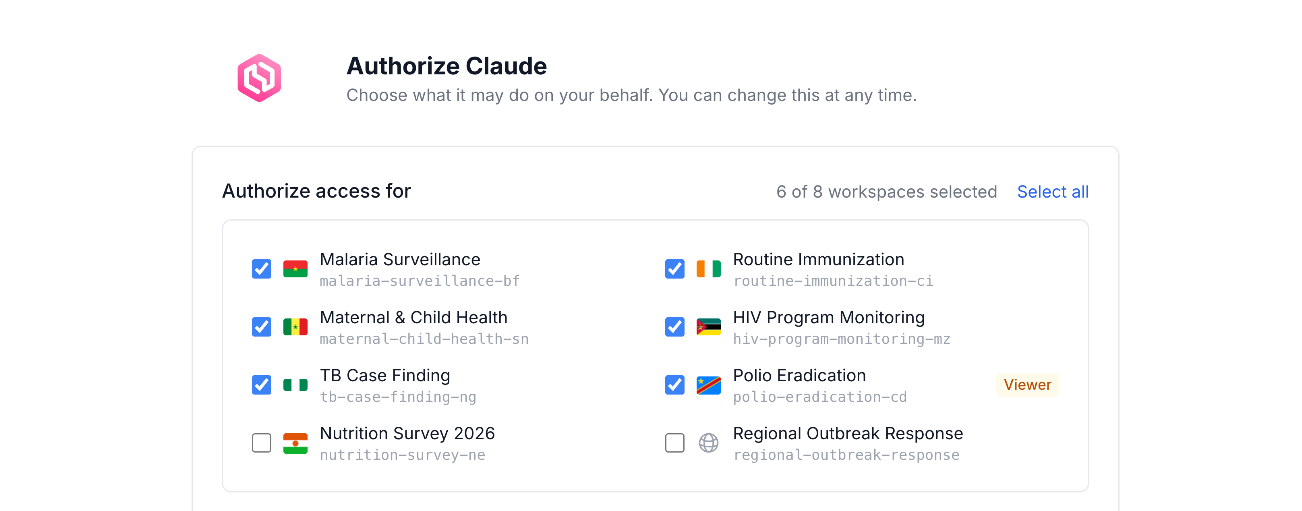
AI assistants are now part of daily data work. With the OpenHEXA connector, Claude, ChatGPT, Gemini CLI or another assistant can inspect a dataset, fix a pipeline or edit a web app directly in your workspaces. From OpenHEXA 5.20, you decide exactly what each assistant may touch: which workspaces it can reach, which resources it can use, and whether it can only read or also write.
Every connection between an AI assistant and OpenHEXA now comes with its own set of connector permissions. Before looking at the new settings, here is a short reminder of what the OpenHEXA connector does.
The Model Context Protocol (MCP), here referred to as the OpenHEXA connector, is an open standard that lets AI assistants work with external tools and data through one structured interface. The OpenHEXA connector, introduced in March 2026, connects the assistant of your choice to your OpenHEXA workspaces. You sign in through OAuth with your usual OpenHEXA credentials, then work in plain language: ask the assistant to inspect a dataset, debug a pipeline or update a web app. Every action goes through your own OpenHEXA account, so the assistant never bypasses the access controls, role-based permissions and data governance rules already in place.
Until now, a connected assistant worked with your full set of permissions: it could reach every workspace and resource you could reach. Granular permissions in OpenHEXA 5.20 let you narrow that scope for each connection. An assistant you use to review datasets in one workspace no longer needs access to pipelines or databases elsewhere. Existing connections are migrated to the new permission model automatically, and reviewing them after the update takes only a few clicks.
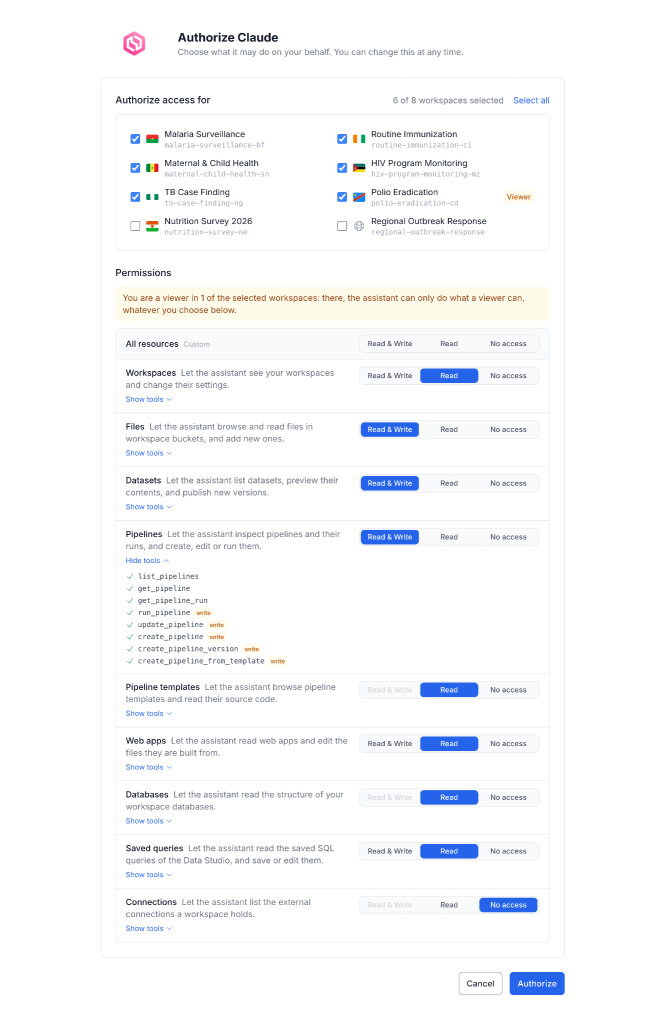
The OpenHEXA connector granular permissions
The new permission model rests on 3 choices, made when you connect an assistant.
When you connect an assistant, OpenHEXA asks you to set its scope. Together, these 3 choices define the access control for that connection.
Workspaces are the first boundary. You select the workspaces the assistant can reach, and every other workspace stays out of its scope. If you only need help on one project, you can grant that single workspace.
Within the selected workspaces, you choose the resources the assistant can work with: workspaces, files, datasets, pipelines, pipeline templates, web apps, databases, saved queries and connections. An assistant you use to fix pipeline code, for example, may only need pipelines and files.
For each resource, you then decide whether the assistant can only read it or also write to it. Read access lets the assistant inspect and explain your work. Write access also lets it create and modify resources. Granting read-only access first is a simple way to see how an assistant behaves before letting it change anything.
These 3 choices narrow what an assistant can do. Some limits, however, apply whatever you grant.
OpenHEXA connector permissions can reduce an assistant’s access. They can never extend it beyond 2 safeguards that apply to every connection.
The AI assistant acts on your behalf and goes through the same permission checks as the OpenHEXA web interface. Your workspace role still sets the limit. In a workspace where you are a viewer, the assistant can only do what a viewer can, whatever permissions you grant it.
No assistant can run SQL against a workspace database or read connection secrets, whatever permissions it holds. Credentials stay protected by the platform itself, one of the data governance commitments behind AI in OpenHEXA.
Permissions can evolve with your work. Under Account → MCP connections, you can review and change the permissions of every connected assistant. The page shows when each assistant was last used, which helps you spot connections that are no longer needed. Changes apply from the assistant’s next call, and revoking a connection cuts its access immediately.
The public AI in OpenHEXA page explains how AI is used in the platform, what the models can access and which models run. Its responsible AI guidance asks users to grant AI only the workspaces and tools it needs, and to revoke connections they no longer use.
The principle of least privilege matters in public health, where datasets and pipelines often support decisions that affect people. Granular connector permissions turn that guidance into a 2-minute task. The same review-first approach applies to the built-in assistant, which helps teams create pipelines and build web apps inside OpenHEXA.
The same documentation page sets out further practices for working with AI: review every change an assistant proposes, inspect SQL before running it, and keep a person involved in decisions that affect people or production data. Permissions define what an assistant can reach, and these practices keep people in charge of what it produces.
If you already use an AI assistant with OpenHEXA, open Account → MCP connections and check what each connection can reach. If you are connecting an assistant for the first time, follow the MCP setup guide, then read the documentation to see what each permission covers.